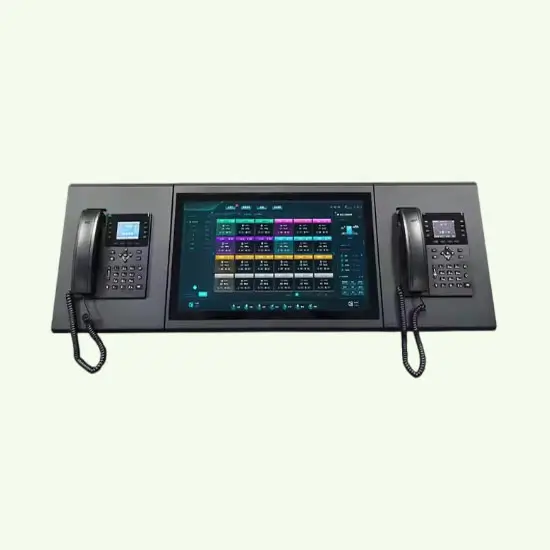
Old intercoms often feel confusing and outdated. New ones can feel like “IT projects.” That gap causes wrong purchases, messy installations, and daily frustration.
An intercom system is a two-way communication system that lets people talk—and often see—each other between stations such as a door station and one or more indoor stations. Modern intercoms can also trigger door release, route calls to multiple endpoints, and integrate with broader security systems. In IP deployments, terms like SIP and ONVIF matter because they help determine how well the intercom can work with phones, video platforms, and access-control tools. SIP is defined by the IETF as a signaling protocol for creating, modifying, and terminating communication sessions, while ONVIF defines standardized interfaces for interoperability among IP-based physical security products. PoE-based deployments commonly rely on IEEE Ethernet power standards.
Most buyers do not need buzzwords. They need a clear map: what an intercom is, what it does, how it works, and which type fits a home, apartment, office, campus, or higher-security site.
What Is an Intercom System?
Many people mix up intercoms, video doorbells, and access control. That is usually where bad buying decisions begin.
An intercom system is a set of stations that supports two-way communication between locations, such as door-to-room, room-to-room, or building-to-building. It may be audio-only or audio + video, and many systems also support door release, call routing, and integration with access-control or security platforms.
Audio-only vs. audio + video intercom
Audio-only intercoms focus on voice communication. They are usually simpler, lower cost, and easier to maintain. Video intercoms add a camera and a local screen or app view, which improves visitor verification and makes them more useful for entrances, lobbies, gates, and delivery handling.
Audio-only often works well for internal communication in offices, factories, classrooms, and some homes. Video becomes more valuable when identity verification at the door matters.
The core idea: stations and communication paths
Every intercom has endpoints. A door station is usually outside and includes a call button, microphone, speaker, and sometimes a camera, keypad, or credential reader. An indoor station is the answering point—often a wall unit, desk unit, software client, guard console, or mobile app.
The stations can be connected through:
- dedicated wiring,
- an Ethernet/IP network,
- or, in some cases, wireless links.
That communication path matters because it affects reliability, latency, scaling, and maintenance.
| Category | What it means | Best for | Typical tradeoff |
|---|---|---|---|
| Audio-only intercom | Voice communication only | Internal calls, lower-cost installs | No visual verification |
| Video intercom | Voice + camera + screen/app | Door entry and security | Higher cost and more planning |
| Single-station | One-to-one calling | Small home entry | Limited routing |
| Multi-station | One-to-many endpoints | Apartments, offices, campuses | More setup and admin work |
How an Intercom System Works
An intercom works by connecting stations through a wired circuit, Ethernet/IP network, or wireless link so a call can be initiated, answered, and ended. In IP systems, power often comes through PoE, which follows IEEE Ethernet power standards. SIP is commonly used for call setup in IP intercom environments, and ONVIF is commonly used when an intercom needs to share video or events with physical security platforms.
1) Call initiation
A visitor presses a button on the door station, or a user starts a call from an indoor station, guard station, or app.
2) Signaling and routing
The system identifies the target endpoint:
- one indoor station in a single-family home,
- a specific apartment in a multi-tenant building,
- a reception desk,
- or a guard station with overflow routing.
In IP systems, routing can follow schedules, groups, or fallback rules.
3) Live communication
The user answers the call and talks two ways. In video intercoms, the answering endpoint also displays live video.
4) Optional actions
The person answering may:
- unlock a door,
- transfer the call,
- escalate it to security,
- or ignore it and let it forward to another endpoint.
5) Logging and integration
More advanced platforms may log events, store snapshots or clips, and pass events to access control or video systems.
| Element | Wired/Analog approach | IP approach | Common pitfall |
|---|---|---|---|
| Call connection | Dedicated circuit | Network signaling | Assuming both behave the same |
| Power | Local or shared supply | PoE or local supply | Underpowered switches/injectors |
| Expansion | Often limited | Often flexible | No addressing or admin plan |
| Maintenance | Hardware-focused | Hardware + network | No update/security process |
What Is an Intercom System Used For?
Intercom systems are used for fast two-way communication, visitor verification, and access workflows such as door release and call routing. In modern deployments, they also support mobile answering, concierge/guard handling, and integration with security infrastructure.
Room-to-room communication
Useful in homes, offices, schools, clinics, and industrial settings where fast internal coordination matters.
Door entry and visitor verification
At entry points, especially shared or restricted ones, video and remote answering reduce uncertainty and improve response speed.
Access workflows
An intercom often becomes part of a simple access workflow:
call → verify → unlock → log
That is where a true intercom usually outperforms a basic consumer doorbell.
| Use case | Must-have functions | Nice-to-have | Risk if missing |
|---|---|---|---|
| Home internal calls | Clear audio, simple calling | Mobile answering | Low usage |
| Door entry | Two-way talk, durable station | Video, night vision | Unknown visitors and delays |
| Multi-tenant | Directory, routing rules | Schedules, logs | Missed calls and tenant complaints |
| Guard/concierge | Transfers, multiple endpoints | Recording, integrations | Slow response and handoff gaps |
The Main Types of Intercom Systems
A lot of intercom content online becomes confusing because it mixes different classification methods. A better way is to separate them into:
- transport: wired vs. wireless
- technology: analog vs. IP
- media: audio-only vs. video
- deployment model: single-family vs. multi-tenant vs. campus/commercial
That keeps the buying logic clear.
Wired intercom systems
Wired systems use physical cabling between stations. They are generally stable and predictable, and they are less vulnerable to RF interference. They fit new construction and high-uptime entry points well.
Wireless intercom systems
Wireless systems reduce cabling and can be faster to deploy, especially in homes and light retrofit scenarios. Their performance depends heavily on building materials, signal conditions, and power strategy.
Analog intercom systems
Analog systems still make sense in some legacy sites where the use case is simple and existing wiring is already in place.
IP intercom systems
IP intercoms run on the network and are often preferred for larger buildings, remote management, integration, and mobile answering. They can be highly flexible, but only if the network and update process are managed properly.
Audio-only intercoms
Good for basic communication and lower budgets.
Video intercoms
Better for entrances, visitor verification, and managed properties.
Single-family vs. multi-tenant systems
Single-family systems are usually simple. Multi-tenant systems need directories, permissions, tenant changes, and stronger routing logic.
| Type category | Strength | Best fit | Common mistake |
|---|---|---|---|
| Wired | High stability | New builds, critical sites | Underestimating cabling work |
| Wireless | Fast install | Small homes, temporary or light retrofit sites | Confusing “range” with reliability |
| Analog | Simplicity | Legacy buildings | Expecting modern integrations |
| IP | Scale + integration | Apartments, offices, campuses | Skipping network/security planning |
| Video | Strong verification | Door entry | Ignoring privacy and lighting |
| Multi-tenant | Routing + admin | Apartments, dorms | Treating it like a home doorbell |
Wired vs. Wireless Intercom: Which Should You Choose?
Wired intercoms usually win on reliability and predictable performance. Wireless intercoms usually win on installation speed and lower disruption. The right choice depends on the building, uptime requirement, power availability, and future expansion needs.
Choose wired when:
- the entry point is critical,
- the building is under construction,
- or you want low-latency, more predictable performance.
Choose wireless or hybrid when:
- retrofit cost is the main constraint,
- the site is small,
- or you need faster deployment with limited wall work.
Practical decision rule
For main entrances, gates, and high-use doors, wired or PoE is often the safer long-term choice. For secondary endpoints or small retrofits, hybrid designs are often more practical.
Analog vs. IP Intercom (and What SIP / ONVIF Mean)
Analog intercoms use simpler, dedicated signaling and can still work well in basic or legacy environments. IP intercoms use digital networking, which improves routing, remote administration, and integration potential. SIP is a signaling protocol used to establish communication sessions, and ONVIF promotes standardized interoperability for IP-based physical security products.
When analog still makes sense
- the site already has usable legacy wiring,
- the use case is simple,
- there is little need for remote management or broader integration.
What IP enables
- centralized admin,
- mobile answering,
- multi-site management,
- easier integration with phones, VMS, and access platforms.
Why SIP matters
If an intercom supports Session Initiation Protocol (SIP) in RFC 3261 1 well, it has a better chance of working with PBX, IP phone, or communication environments that already use open telephony standards.
Why ONVIF matters
If the intercom needs to share video streams or events with a video/security stack, ONVIF Profiles, add-ons, and specifications 2 may reduce integration friction. ONVIF’s role is to promote standardized interfaces for interoperability across IP-based physical security products.
| Topic | Analog | IP | What to confirm |
|---|---|---|---|
| Management | Mostly on-site | Remote capable | Roles, admin tools, updates |
| Integrations | Limited | Strong potential | SIP, ONVIF, API support |
| Scaling | Often constrained | Usually easier | Licensing and endpoint limits |
| Security | Mostly physical | Physical + network | Credentials, patches, segmentation |
| Best for | Legacy/simple use | Modern/large deployments | Match to ops maturity |
Intercom System vs. Video Doorbell Camera
A video doorbell can be enough for one home and one entrance. A true intercom system is usually the better fit when you need multiple endpoints, structured routing, door release workflows, or multi-tenant administration.
A small home may only need:
- one door device,
- one or two phones,
- and basic visitor answering.
A managed building often needs:
- a directory,
- multiple indoor or mobile endpoints,
- backup routing,
- user administration,
- and dependable door control.
That is why these two categories overlap, but they are not identical.
Typical Intercom Layouts by Building Type
Below are simple scheme blocks you can turn into final diagrams in design.
1) Single-family home
[Gate / Front Door Station]
          │
          ├──> [Indoor Monitor]
          └──> [Mobile App]
                    │
              [Remote Door Unlock]
Best fit: one entrance, one family, basic visitor verification, optional remote answering.
2) Apartment / multi-tenant building
[Main Entry Panel with Directory]
               │
        [IP / Building Network]
               │
   ┌───────────┼───────────┐
   │           │           │
[Unit A]     [Unit B]   [Guard / Concierge]
   │           │           │
[Phone/App] [Phone/App] [Admin Console]
               │
         [Door Release + Event Log]
Best fit: tenant directory, frequent resident turnover, centralized management.
3) Commercial office / warehouse
[Main Door / Gate Intercom]
             │
        [PoE Network]
             │
   ┌─────────┼─────────┐
   │         │         │
[Reception] [Security] [Mobile Backup]
   │
[Access Control / VMS / Badge System]
Best fit: deliveries, employee access, guard handoff, integration with cameras and access control.
4) Campus / multi-building site
[Building A Entry]   [Building B Entry]   [Vehicle Gate]
        │                  │                  │
        └──────────[Central Security Platform]──────────┘
                           │
                 [Dispatch / Guard Station]
                           │
               [Access Control + Video Platform]
Best fit: many entrances, centralized oversight, rule-based routing, long-term scalability.
How to Choose the Right Intercom System
Choose an intercom by building type, endpoint count, and workflow first. Then decide on video vs. audio, wired vs. wireless, and analog vs. IP based on cabling, network readiness, and reliability requirements.
1) Start with the building
Ask:
- Is this a home, apartment, office, school, industrial site, or campus?
- How many doors and stations exist now?
- How many may be added later?
2) Define the workflow
Ask:
- Do we need to see visitors?
- Do we need to unlock from inside?
- Do we need mobile answering?
- Do we need logs or audit trails?
- Who manages users and credentials?
3) Check the cabling reality
New build and retrofit projects are very different. Cabling cost, conduit availability, wall finish, and power delivery often decide the real answer more than features do.
4) If choosing IP, treat it like a networked security device
That means planning for:
- IEEE 802.3bt Power over Ethernet standard guidance 3,
- network segmentation where appropriate,
- firmware updates,
- strong credentials,
- and access controls for who can view live or recorded video.
CISA Internet Exposure Reduction Guidance 4 recommends changing default credentials, and FTC guidance on securing home security cameras 5 stresses built-in security features such as encryption.
| Checklist item | Questions to answer | Why it matters |
|---|---|---|
| Building type | Home, apartment, office, industrial? | Sets routing and durability needs |
| Endpoints | How many now and later? | Prevents early system limits |
| Workflows | Video, unlock, mobile answering? | Defines the baseline |
| Cabling | New build or retrofit? | Drives wired/wireless choice |
| Network | PoE, admin, security? | Ensures stable IP operation |
| Operations | Who manages users and updates? | Reduces downtime and complaints |
Trust Signals Buyers Should Look For
When comparing systems, look for evidence beyond marketing language.
Useful technical trust signals
- clear support for SIP, ONVIF, or documented APIs where relevant,
- clear PoE requirements and supported power method,
- documented update policy and security practices,
- admin roles, audit logs, and user permission controls,
- documented integration support with access control or VMS,
- support resources for installers and operators.
Useful operational trust signals
- real deployment examples,
- building-type-specific references,
- clear maintenance model,
- privacy documentation for video and cloud storage.
Real-World Deployment Examples
Real-world deployments often show why the “right intercom” depends on building type.
- In healthcare, intercom and access technologies are often used to improve visitor screening and control access to restricted areas; for example, the Martin Luther King, Jr. Community Hospital security deployment 6 incorporated Axis, 2N, and Sound Intelligence technologies to improve visitor screening and access control.
- Residential high-rise and retrofit projects are common use cases for IP or modernized intercom deployments; both 2N’s 50-year-old residential retrofit success story 7 and Comelit’s IP video intercom case study in New York 8 publish examples centered on retrofits, resident experience, and large-building access management.
- In commercial environments, intercom vendors frequently position intercom + access control + CCTV/VMS integration as the preferred pattern for visitor handling and building entry management.
These examples do not mean one architecture fits every site. They show that use case, building type, and operational model drive the best answer.
FAQ
What range can wireless intercoms reach?
Wireless range depends on walls, floors, metal, and interference. Real-world range is often much lower than open-air range claims. For critical entrances, field testing is safer than relying on brochure numbers.
Does an intercom require Wi-Fi?
No. Many intercoms are wired. IP intercoms often use Ethernet, and many PoE-based systems do not need Wi-Fi at all. PoE-based Ethernet deployments are common in modern IP environments.
How much does an intercom system typically cost?
Costs vary by building type, number of endpoints, wiring complexity, door hardware, and whether cloud services are involved. In practice, buyers should budget for:
- hardware,
- installation labor,
- network work,
- door release hardware,
- admin/setup,
- and any recurring software or cloud fees.
A basic single-door setup may be relatively simple, while multi-tenant or integrated commercial deployments can become much more expensive because labor, wiring, and management complexity rise quickly.
What maintenance does an intercom system need?
Typical maintenance includes:
- checking audio/video quality,
- verifying door release operation,
- reviewing user permissions,
- applying firmware/software updates,
- replacing failed power supplies, batteries, or worn components,
- and periodically testing routing and backup procedures.
For IP systems, maintenance is not only hardware maintenance—it is also account, patch, and network maintenance. CISA and FTC guidance both support strong credential and security-update practices for connected devices, and the FTC Careful Connections IoT security resource 9 is a useful baseline checklist.
How long does an intercom system last?
Useful life depends on environment, component quality, exposure, and software support. Outdoor stations at busy or exposed entrances may age faster than indoor monitors. In many modern IP deployments, replacement timing is driven not only by hardware failure but also by vendor support windows and security update availability. FTC staff has noted that many smart products fail to clearly disclose how long they will receive software updates, which is important when evaluating long-term viability.
What privacy and compliance issues should buyers consider?
If the system records or streams video, privacy is part of the buying decision. The ICO home CCTV systems guidance (including smart doorbells) 10 explicitly covers smart doorbell cameras and stresses issues such as placement, minimizing capture of neighboring/private areas, authorized viewing, and overall data protection responsibilities. FTC actions involving connected camera products also show the risks of weak privacy controls and poor internal access management.
Can audio and video stations be mixed in one system?
Many modern systems can mix them, but support depends on the platform. This can be a good cost-control strategy: put video where identity verification matters, and use audio-only where it does not.
What is best for an apartment building?
Apartments usually need:
- tenant directory,
- mobile or indoor answering,
- permission management,
- easy resident turnover,
- and reliable uptime.
That often pushes the decision toward managed IP systems, but the final answer still depends on cabling, budget, and how the property team wants to operate the building.
Conclusion
An intercom system is not just a talking device. It is a communication and entry workflow tool. The right choice starts with the building and the workflow, not with a buzzword.
For small homes, a basic setup may be enough. For apartments, offices, campuses, and higher-security sites, the decision usually comes down to reliability, routing, integration, and manageability over time.
Choose by workflow first. Then choose wired vs. wireless and analog vs. IP based on the real constraints: building type, endpoint count, power, network readiness, privacy needs, and long-term operations.
Footnotes
-
Official IETF SIP standard reference for understanding compatibility expectations. ↩ ↩
-
Explains ONVIF profiles/specs that affect interoperability with VMS and security platforms. ↩ ↩
-
Practical overview of IEEE 802.3bt PoE capabilities for budgeting switch/injector power. ↩ ↩
-
CISA checklist on reducing exposure, including changing default credentials and patching. ↩ ↩
-
Consumer-focused steps for securing camera devices (passwords, updates, privacy settings). ↩ ↩
-
Real hospital case study showing intercom + security tech used for visitor screening and access control. ↩ ↩
-
Retrofit example showing how older residential buildings modernize intercoms with minimal disruption. ↩ ↩
-
High-rise IP video intercom case study illustrating multi-tenant requirements and deployment complexity. ↩ ↩
-
FTC IoT security guidance covering authentication, access control, and secure data management basics. ↩ ↩
-
UK privacy guidance for smart doorbells/home CCTV, including placement and minimizing unintended capture. ↩ ↩